pip install pointblank2 Getting Started
Before you can validate data you need to install Pointblank and understand how a basic validation is structured. This chapter walks through installation, introduces the handful of concepts that underlie everything the library does, and works a complete example from data to results, so that by the end you have a working setup, a clear mental model, and the ability to write and run your own validation plans.
We begin with installation and its optional extras, move through the core ideas of test units, validation steps, and interrogation, and then build and interrogate a first plan against a built-in dataset. Along the way we preview the data sources and configuration options that later chapters develop in full.
2.1 Installing Pointblank
Pointblank installs with only the dependencies you ask for, which keeps an environment lean and avoids the conflicts that come from pulling in more than you need. The base install provides the core validation functionality.
Most users want a DataFrame library alongside it, and support for Polars, Pandas, or both installs through an extra, as does the Ibis backend for whichever database you connect to.
pip install "pointblank[pl]"        # Polars
pip install "pointblank[pd]"        # Pandas
pip install "pointblank[duckdb]"    # DuckDB via Ibis
pip install "pointblank[postgres]"  # PostgreSQL via Ibis
The AI-assisted features of Chapter 18 and Chapter 17 need the generation extra, and the MCP server of Chapter 22 needs its own.
pip install "pointblank[generate]"  # language-model features
pip install "pointblank[mcp]"       # the MCP server
After installing, a quick import confirms the setup, printing the version without error.
print(pb.__version__)1.2.1.dev1+g6213f1d31The alias pb is used throughout this book and the official documentation, and keeping it makes examples easier to follow and validation code concise when many methods are chained together.
2.2 Core concepts
It is worth a moment on the conceptual model before writing code, because Pointblank is more granular than a tool that returns a single pass-or-fail verdict. It tells you how much of your data passed or failed and which specific rows had problems. So validation does more than stop bad data. It also helps you understand and improve data quality over time. Three ideas, the test unit, the validation step, and interrogation, form the vocabulary the rest of the book uses.
2.2.1 Test units
A test unit is the atomic element that a check evaluates, and what counts as one depends on the check. For a column-value check such as col_vals_gt(), each row of the target column is a test unit, so a check over a thousand-row column has a thousand test units that each pass or fail independently. For a row check such as rows_distinct(), each row of the table is a test unit. For a table check such as col_exists(), there is usually a single test unit standing for the table as a whole.
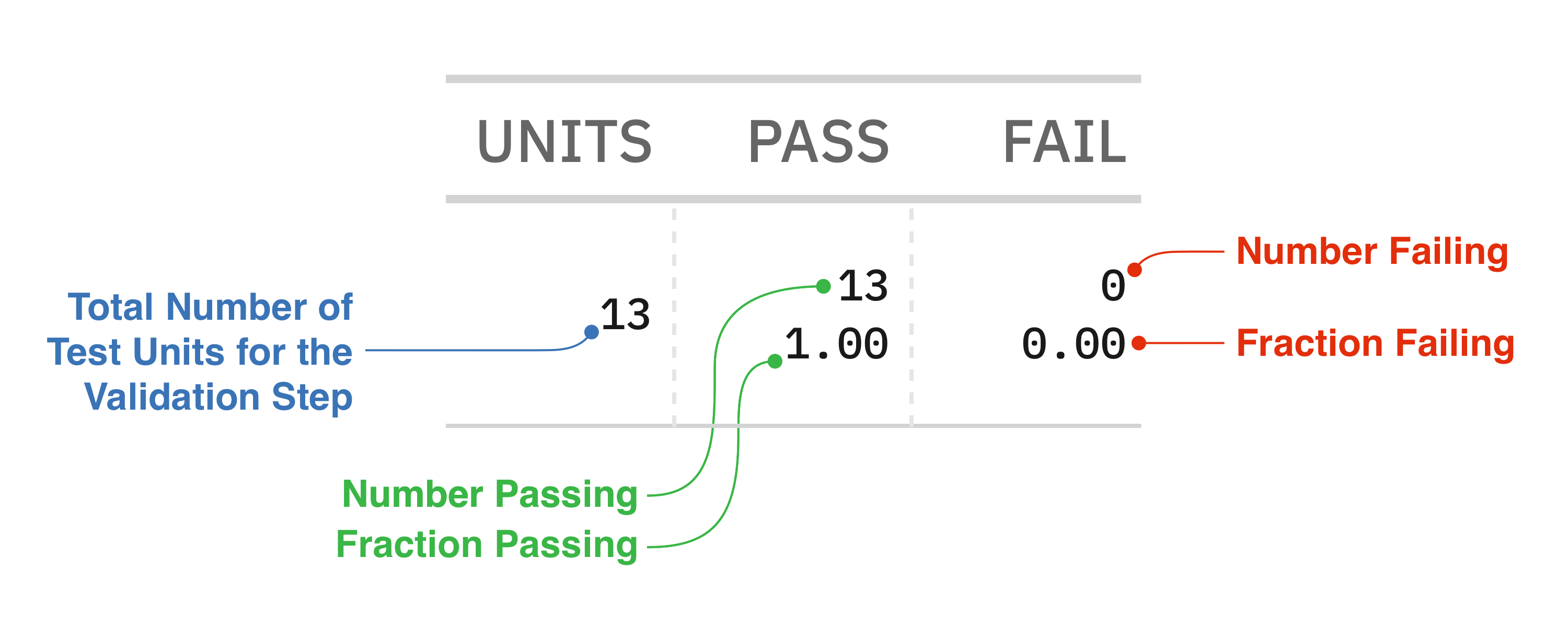
This accounting is what makes results precise. The difference between “your data failed validation” and “five percent of transactions have negative amounts” is the difference between knowing there is a problem and knowing its scope, its likely cause, and how to prioritize it, and test-unit counting is what provides the second.
2.2.2 Validation steps
A validation step is a single check within a plan, created by one call to a validation method, and a plan usually holds several. Steps are numbered from one in the order they are added, and those numbers appear in reports and in the methods that retrieve results. Steps are also independent, so the failure of one never prevents the others from running, and a single interrogation gives you the complete picture rather than stopping at the first problem. That is a deliberate choice: a fail-fast approach would make you run validation repeatedly to discover several problems, whereas this design surfaces them all at once, which is what makes it useful as a diagnostic.
2.2.3 The Validate class
The Validate class is the central object. It holds the target data, accumulates the steps, and runs the interrogation, so it works as a plan builder: you start from data, describe your expectations through chained method calls, and then execute the plan. Creating one requires at least a data source, and a small sample makes this concrete.
import polars as pl

sample = pl.DataFrame({
    "customer_id": ["C001", "C002", None, "C004", "C005"],
    "amount": [150.00, -25.50, 89.99, 200.00, 45.00],
})
Because the methods return the same object, checks chain fluently, and optional metadata like a table name and label can be supplied to the constructor to appear in reports.
plan = (
    pb.Validate(data=sample, tbl_name="sample", label="Getting-started example")
    .col_vals_gt(columns="amount", value=0)
    .col_vals_not_null(columns="customer_id")
)

plan
Pointblank ValidationNo Interrogation Performed |
|||||||||||||
Getting-started example Polarssample |
|||||||||||||
| STEP | COLUMNS | VALUES | TBL | EVAL | UNITS | PASS | FAIL | W | E | C | EXT | ||
|---|---|---|---|---|---|---|---|---|---|---|---|---|---|
| #4CA64C66 | 1 |
col_vals_gt()
|
— | ||||||||||
| #4CA64C66 | 2 |
col_vals_not_null()
|
— | ||||||||||
At this point no validation has run, and displaying the plan shows its structure with the results columns empty and a “No Interrogation Performed” note, which is a useful way to confirm a plan is built correctly before committing to execution. The separation between defining a plan and running it is what lets a plan be built programmatically, stored, inspected, or serialized to YAML as in Chapter 20. The plan is a first-class object, not a side effect of running code.
2.2.4 Interrogation
Interrogation is the step that executes the plan against the data. Until you call interrogate(), the plan is only a specification, and after you call it, you have results. The name is deliberate, since you are questioning the data systematically and recording the answers. Validation is closer to an investigation than a simple pass or fail. The interrogate() method returns the same Validate object, now populated with results, so you can continue the chain or assign it for inspection. For database-backed data the work happens on the server, so validation scales with the database rather than your local machine.
2.3 Your first validation
With the concepts in place, a complete example ties them together, using a built-in dataset so you can run it with nothing more than the base install.
2.3.1 Loading and previewing the data
The load_dataset() function returns one of the bundled datasets, and preview() shows it compactly.
small_table = pb.load_dataset(dataset="small_table", tbl_type="polars")

pb.preview(small_table)PolarsRows13Columns8 |
||||||||
The preview shows the data’s shape and a mix of column types: a and c are integers, b and f are strings, d is a float, e is a boolean, and there are date and date_time columns. The small_table dataset is deliberately small, thirteen rows and eight columns, so you can trace results by hand, and it carries a few imperfections such as null values that make it useful for showing how validation handles real data.
2.3.2 Building and running a plan
A plan gathers several expectations, each the kind of rule that might come from a business requirement or a data contract.
validation = (
    pb.Validate(data=small_table, tbl_name="small_table", label="First validation example")
    .col_vals_gt(columns="d", value=100)
    .col_vals_le(columns="c", value=10)
    .col_vals_not_null(columns="a")
    .col_exists(columns=["date", "date_time"])
    .interrogate()
)

validationEach step states one expectation. The first requires column d to exceed 100, the second requires column c to be at most 10, the third requires the identifier column a to have no nulls, and the fourth confirms the table has the date and date_time columns, expanding into two steps because it names two columns. Reading the plan almost like documentation of the data’s requirements is intentional, since validation plans often double as executable specifications. The report shows the outcome: most steps pass, but the check on column c fails on two rows, because that column holds two nulls and a null cannot be shown to satisfy the at-most-ten condition. That mix of passing and failing steps is exactly the diagnostic picture that helps you prioritize.
2.3.3 Reading results in code
The visual report suits human review, but automation needs the results as plain values, and several methods provide them. The n_failed() method returns the failing count per step as a dictionary.
validation.n_failed(){1: 0, 2: 2, 3: 0, 4: 0, 5: 0}The result confirms that only the second step failed, on two test units, while the others reported none. For an overall verdict, all_passed() returns a single boolean.
validation.all_passed()FalseIt is False here, because that second step had failures, and this is the boolean a pipeline branches on to decide whether to proceed. To see the rows behind a failure, get_data_extracts() returns them, and asking for the second step yields the two rows whose c value is null.
validation.get_data_extracts(i=2, frame=True)
shape: (2, 9)
| _row_num_ | date_time | date | a | b | c | d | e | f |
|---|---|---|---|---|---|---|---|---|
| u32 | datetime[μs] | date | i64 | str | i64 | f64 | bool | str |
| 4 | 2016-01-06 17:23:00 | 2016-01-06 | 2 | "5-jdo-903" | null | 3892.4 | false | "mid" |
| 13 | 2016-01-30 11:23:00 | 2016-01-30 | 1 | "3-dka-303" | null | 2230.09 | true | "high" |
Instead of guessing why rows failed, you examine the actual data, which is what makes extracts invaluable for debugging. These accessors let validation feed larger workflows, and Chapter 14 covers reporting and extraction in depth. To keep later output compact, we hide the report footer from here on.
pb.config(report_incl_footer=False)PointblankConfig(report_incl_header=True, report_incl_footer=False, report_incl_footer_timings=True, report_incl_footer_notes=True, report_incl_dimensions=False, preview_incl_header=True, dimension_map=None, dimension_weights=None, dimension_thresholds=None)2.4 Where your data can live
Real data lives in many places, and Pointblank meets it where it is, with the same API across all of them, so a col_vals_gt() check works identically on a Polars DataFrame, a Pandas DataFrame, or a database table. A DataFrame is passed directly to Validate, whether Polars for speed or Pandas for its ubiquity. A database table is reached through Ibis, either as a table object or through a connection string like "duckdb:///path/to/db.ddb::table_name", in which case the checks run as SQL on the server and scale to tables too large for memory. A CSV or Parquet file can be passed as a path, and the file type is detected from the extension. These options are the subject of Chapter 19, which develops them in full, and here it is enough to know that the validation you learn transfers unchanged across them.
pb.Validate(data="data/sales.csv").col_vals_gt(columns="revenue", value=0).interrogate()
pb.Validate(data="duckdb:///warehouse.ddb::orders").col_vals_not_null(columns="id").interrogate()
2.5 A first look at configuration
The examples so far use sensible defaults, but two options are worth previewing because they recur. Thresholds grade a failure by how much of the data fails rather than treating any failure as fatal, so a plan can tolerate minor issues while escalating serious ones, and they are set on the Validate object.
pb.Validate(
    data=small_table,
    thresholds=pb.Thresholds(warning=0.05, error=0.10, critical=0.20),
).col_vals_gt(columns="d", value=100).interrogate()
Under these levels a failure rate up to five percent passes, then a warning, an error, and finally a critical result as the rate climbs, which Chapter 13 develops. Reports can also be localized, since the people who read them do not all work in English, and the lang parameter renders labels and messages in another language while the validation logic stays the same.
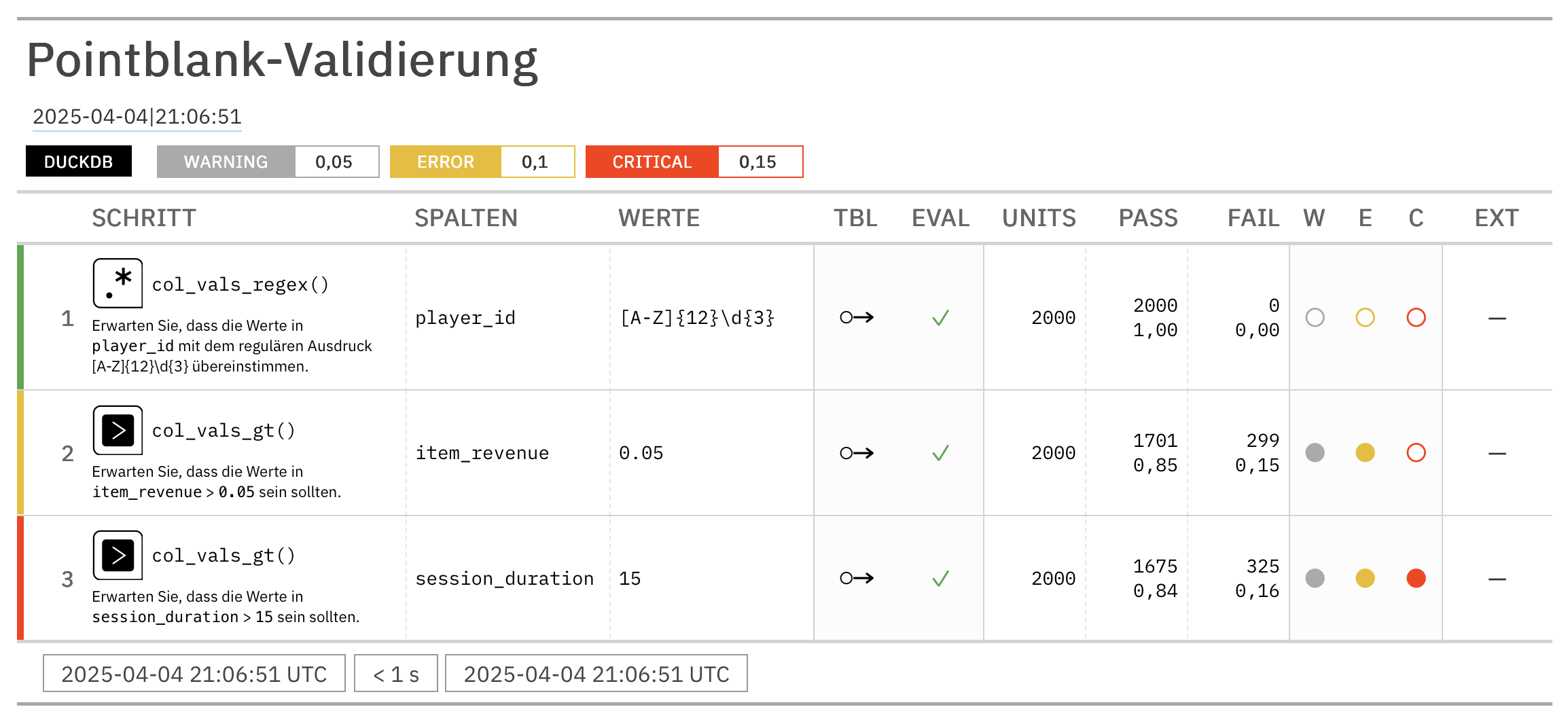
Settings that should apply across a whole project, such as report appearance, are set once with pb.config(), which we used above to hide the footer, and per-validation settings override those defaults where needed.
2.6 Summary
This chapter established the foundation for working with Pointblank. You installed the library with the extras your work needs, met the three core ideas, and ran a complete validation from data to results, seeing how the tool provides granular, diagnostic information rather than a bare verdict. The test unit is the atomic element being checked, a row for a column validation and the table for a schema check, and its counting is what makes results precise. A validation step is one independent check, and because steps do not stop each other, a single interrogation gives the whole icture. Interrogation is the moment a plan becomes results, and until then the plan is a first-class object you can build, inspect, and store.
The all_passed() method returns one boolean for the plan while n_failed() and get_data_extracts() give per-step detail and the failing rows, so results drive both human review and automated logic. The same API validates DataFrames, database tables, and files alike, and thresholds and localization preview the configuration that later chapters cover. With this foundation in place, the next chapter, Chapter 3, turns to inspecting and profiling data, the discovery step that precedes writing good validation rules.